
Geometries
BattMo supports several battery-cell geometries through the ModelFramework setting. These geometries determine how the electrochemical model is distributed in space, which grids are constructed, and which component-wise outputs are available.
The currently supported geometry families are:
P2DP4D PouchP4D Cylindrical
Overview
| Model framework | Cell type | Spatial representation | Typical use |
|---|---|---|---|
P2D | Through-thickness cell model | 1D across the stack, with radial particle diffusion | Fast cell-level studies, parameter sweeps, cycling analysis |
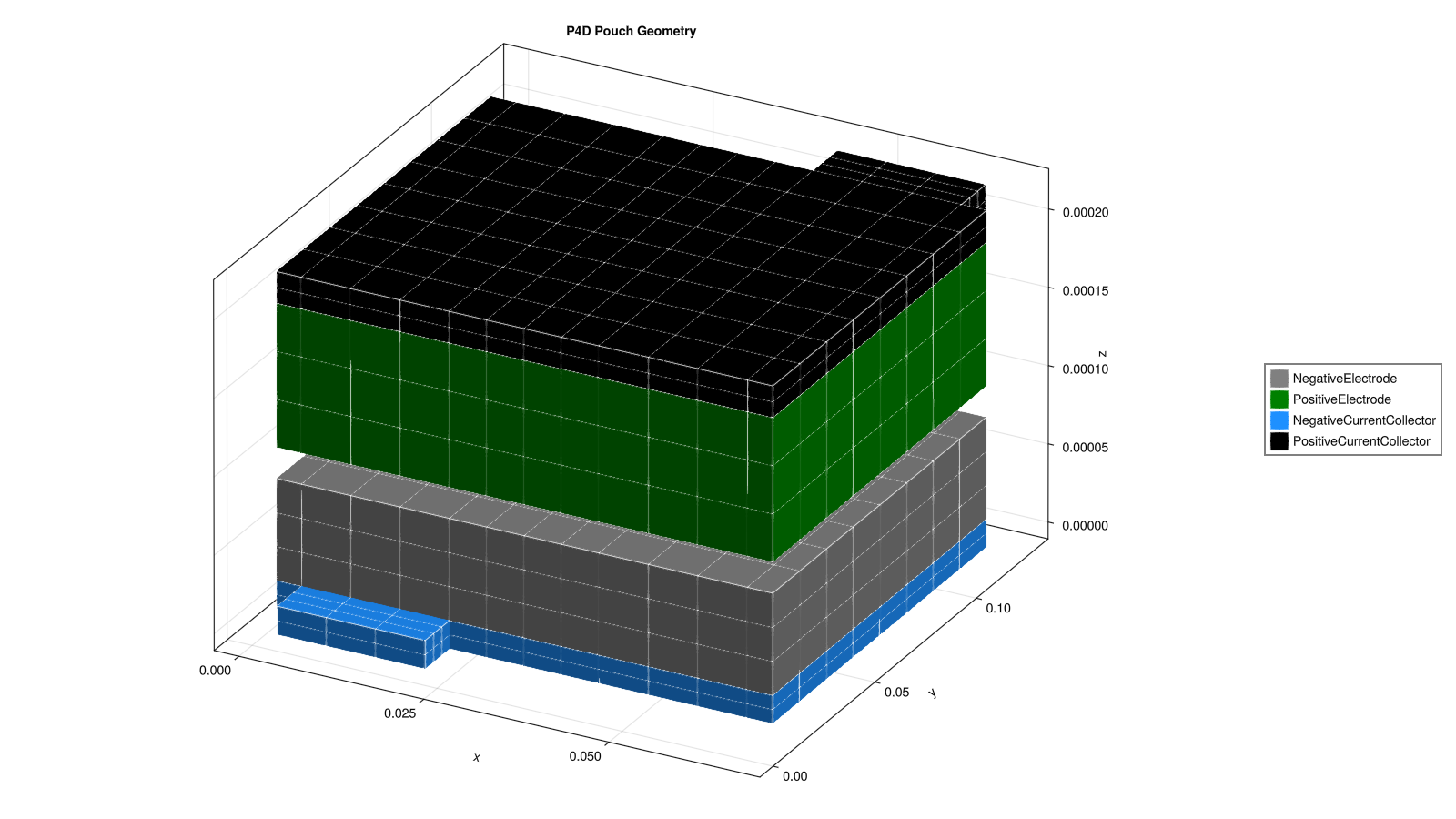
P4D Pouch | Pouch cell | 3D current-collector / electrode geometry combined with particle diffusion | Tab placement effects, current distribution, pouch thermal/electrical nonuniformity |
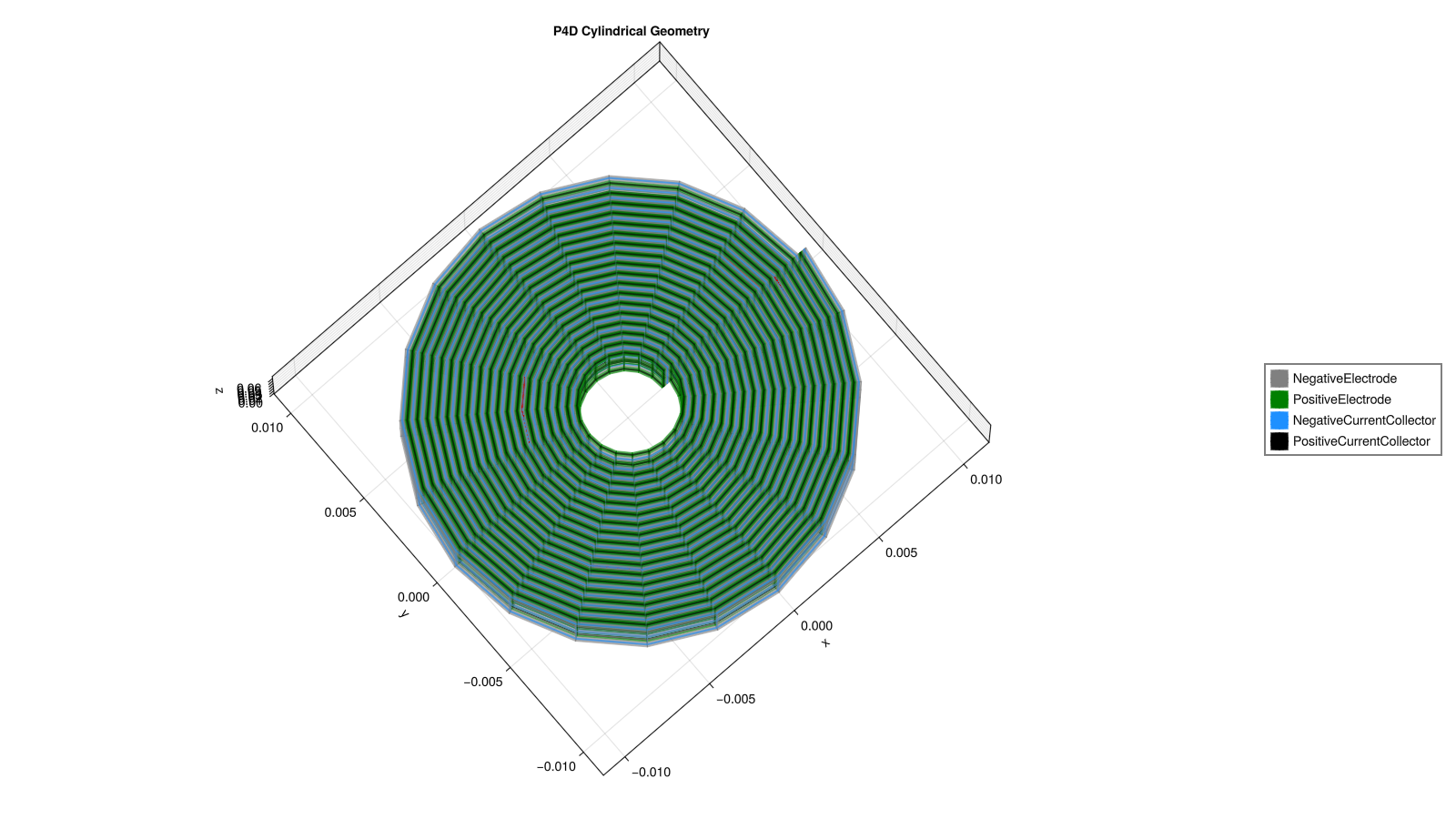
P4D Cylindrical | Cylindrical / jelly-roll cell | Cylindrical wound-cell geometry combined with particle diffusion | Radial and axial heterogeneity in cylindrical cells |
In all three cases, BattMo uses a pseudo-dimensional formulation:
the electrolyte and solid-phase transport are resolved on the cell geometry
diffusion inside active-material particles is resolved on a particle-radius coordinate
component coupling is handled automatically in the assembled multiphysics model
P2D
P2D is the classical Doyle-Fuller-Newman style through-thickness model. The cell is represented as a one-dimensional stack:
negative electrode
separator
positive electrode
If current collectors are enabled, the stack also includes:
negative current collector
positive current collector
This is the most efficient option and is usually the right starting point when:
studying voltage response, concentration profiles, or degradation behavior
calibrating parameters
running large parameter sweeps
current-collector in-plane effects are not important
For P2D, BattMo provides:
a global through-cell position,
output.states["Cell"]["Position"]component-wise positions, such as
output.states["NegativeElectrode"]["ActiveMaterial"]["Position"]
Main Cell Parameters
| Input path | Meaning |
|---|---|
["NegativeElectrode"]["Coating"]["Thickness"] | Negative electrode coating thickness. |
["PositiveElectrode"]["Coating"]["Thickness"] | Positive electrode coating thickness. |
["Separator"]["Thickness"] | Separator thickness. |
["NegativeElectrode"]["CurrentCollector"]["Thickness"] | Negative current collector thickness, when current collectors are enabled. |
["PositiveElectrode"]["CurrentCollector"]["Thickness"] | Positive current collector thickness, when current collectors are enabled. |
Main Simulation Settings
| Setting | Meaning |
|---|---|
NegativeElectrodeCoatingGridPoints | Number of cells through the negative electrode coating thickness. |
PositiveElectrodeCoatingGridPoints | Number of cells through the positive electrode coating thickness. |
SeparatorGridPoints | Number of cells through the separator thickness. |
NegativeElectrodeParticleGridPoints | Radial resolution inside negative active-material particles. |
PositiveElectrodeParticleGridPoints | Radial resolution inside positive active-material particles. |
NegativeElectrodeCurrentCollectorGridPoints | Number of cells through the negative current collector thickness. |
PositiveElectrodeCurrentCollectorGridPoints | Number of cells through the positive current collector thickness. |

P4D Pouch
P4D Pouch resolves the cell in a pouch-cell geometry. The model keeps the pseudo-dimensional electrochemistry, but the cell components are placed on a multi-dimensional spatial grid so that in-plane current and potential variations can be captured.
This geometry is useful when:
tab placement matters
current collectors contribute significantly to the cell response
you want to visualize spatially varying potentials, concentrations, or currents
nonuniform utilization across the pouch is important
The main components represented are:
negative current collector
negative electrode active material / coating
separator
electrolyte
positive electrode active material / coating
positive current collector
BattMo provides component-wise mesh positions for these domains in the output, for example:
output.states["NegativeElectrode"]["CurrentCollector"]["Position"]output.states["PositiveElectrode"]["ActiveMaterial"]["Position"]output.states["Electrolyte"]["Position"]
Main Cell Parameters
| Input path | Meaning |
|---|---|
["Cell"]["ElectrodeWidth"] | Physical electrode width of the pouch cell. |
["Cell"]["ElectrodeLength"] | Physical electrode length of the pouch cell. |
["Cell"]["TabWidth"] | Width of the pouch tabs. |
["Cell"]["TabLength"] | Length of the pouch tabs. |
["Cell"]["TabsOnSameSide"] | Whether positive and negative tabs are placed on the same side of the pouch. |
["NegativeElectrode"]["CurrentCollector"]["TabPositionFraction"] | Tab position along the negative current collector width, from 0 to 1. |
["PositiveElectrode"]["CurrentCollector"]["TabPositionFraction"] | Tab position along the positive current collector width, from 0 to 1. |
["NegativeElectrode"]["Coating"]["Thickness"] | Negative electrode coating thickness. |
["PositiveElectrode"]["Coating"]["Thickness"] | Positive electrode coating thickness. |
["Separator"]["Thickness"] | Separator thickness. |
["NegativeElectrode"]["CurrentCollector"]["Thickness"] | Negative current collector thickness. |
["PositiveElectrode"]["CurrentCollector"]["Thickness"] | Positive current collector thickness. |
Main Simulation Settings
| Setting | Meaning |
|---|---|
ElectrodeWidthGridPoints | In-plane grid resolution along pouch width. |
ElectrodeLengthGridPoints | In-plane grid resolution along pouch length. |
TabWidthGridPoints | In-plane resolution across the pouch tab width. |
TabLengthGridPoints | In-plane resolution along the pouch tab length. |
NegativeElectrodeCoatingGridPoints | Number of cells through the negative electrode coating thickness. |
PositiveElectrodeCoatingGridPoints | Number of cells through the positive electrode coating thickness. |
SeparatorGridPoints | Number of cells through the separator thickness. |
NegativeElectrodeParticleGridPoints | Radial resolution inside negative active-material particles. |
PositiveElectrodeParticleGridPoints | Radial resolution inside positive active-material particles. |
NegativeElectrodeCurrentCollectorGridPoints | Number of cells through the negative current collector thickness. |
PositiveElectrodeCurrentCollectorGridPoints | Number of cells through the positive current collector thickness. |
NegativeElectrodeCurrentCollectorTabWidthGridPoints | Resolution across the negative tab face. |
NegativeElectrodeCurrentCollectorTabLengthGridPoints | Resolution along the negative pouch-tab face length. |
PositiveElectrodeCurrentCollectorTabWidthGridPoints | Resolution across the positive tab face. |
PositiveElectrodeCurrentCollectorTabLengthGridPoints | Resolution along the positive pouch-tab face length. |
See also:
P4D Cylindrical
P4D Cylindrical targets cylindrical cells with a jelly-roll type internal structure. It extends the pseudo-dimensional electrochemistry to a cylindrical geometry so that spatial variations around the wound cell can be represented.
This geometry is useful when:
modelling cylindrical commercial cells
studying radial and axial nonuniformities
investigating tab-driven current distribution
comparing simplified
P2Dbehavior with a more spatially resolved cylindrical model
As for the pouch case, outputs are provided component-wise for the resolved domains.
Main Cell Parameters
| Input path | Meaning |
|---|---|
["Cell"]["InnerRadius"] | Inner jelly-roll radius. |
["Cell"]["OuterRadius"] | Outer jelly-roll radius. |
["Cell"]["Height"] | Axial height of the cylindrical cell. |
["NegativeElectrode"]["CurrentCollector"]["TabFractions"] | Angular or spiral placement of one or more negative tabs as fractions of total spiral length. |
["PositiveElectrode"]["CurrentCollector"]["TabFractions"] | Angular or spiral placement of one or more positive tabs as fractions of total spiral length. |
["NegativeElectrode"]["CurrentCollector"]["TabWidth"] | Width of the negative current-collector tab. |
["PositiveElectrode"]["CurrentCollector"]["TabWidth"] | Width of the positive current-collector tab. |
["NegativeElectrode"]["Coating"]["Thickness"] | Negative electrode coating thickness. |
["PositiveElectrode"]["Coating"]["Thickness"] | Positive electrode coating thickness. |
["Separator"]["Thickness"] | Separator thickness. |
["NegativeElectrode"]["CurrentCollector"]["Thickness"] | Negative current collector thickness. |
["PositiveElectrode"]["CurrentCollector"]["Thickness"] | Positive current collector thickness. |
Main Simulation Settings
| Setting | Meaning |
|---|---|
HeightGridPoints | Number of grid cells along the cylinder height. |
AngularGridPoints | Number of angular sectors used around the jelly roll. |
NegativeElectrodeCoatingGridPoints | Number of cells through the negative electrode coating thickness. |
PositiveElectrodeCoatingGridPoints | Number of cells through the positive electrode coating thickness. |
SeparatorGridPoints | Number of cells through the separator thickness. |
NegativeElectrodeParticleGridPoints | Radial resolution inside negative active-material particles. |
PositiveElectrodeParticleGridPoints | Radial resolution inside positive active-material particles. |
NegativeElectrodeCurrentCollectorGridPoints | Number of cells through the negative current collector thickness. |
PositiveElectrodeCurrentCollectorGridPoints | Number of cells through the positive current collector thickness. |
NegativeElectrodeCurrentCollectorTabWidthGridPoints | Resolution across the negative tab face. |
PositiveElectrodeCurrentCollectorTabWidthGridPoints | Resolution across the positive tab face. |
See also:
Choosing A Geometry
As a rule of thumb:
use
P2Dwhen speed and robust cell-scale trends are most importantuse
P4D Pouchfor pouch cells with spatially resolved collector/electrode effectsuse
P4D Cylindricalfor cylindrical cells where wound-cell geometry matters
You select the geometry through the model settings:
model_settings = load_model_settings(; from_default_set = "p4d_pouch")
model = LithiumIonBattery(; model_settings)
or by setting:
model_settings["ModelFramework"] = "P2D"